To create a dependent form
[If required] Open the custom integration settings tab, main menu item or open pop-up workload action, then click UI builder.
Click
 in the Form group bar.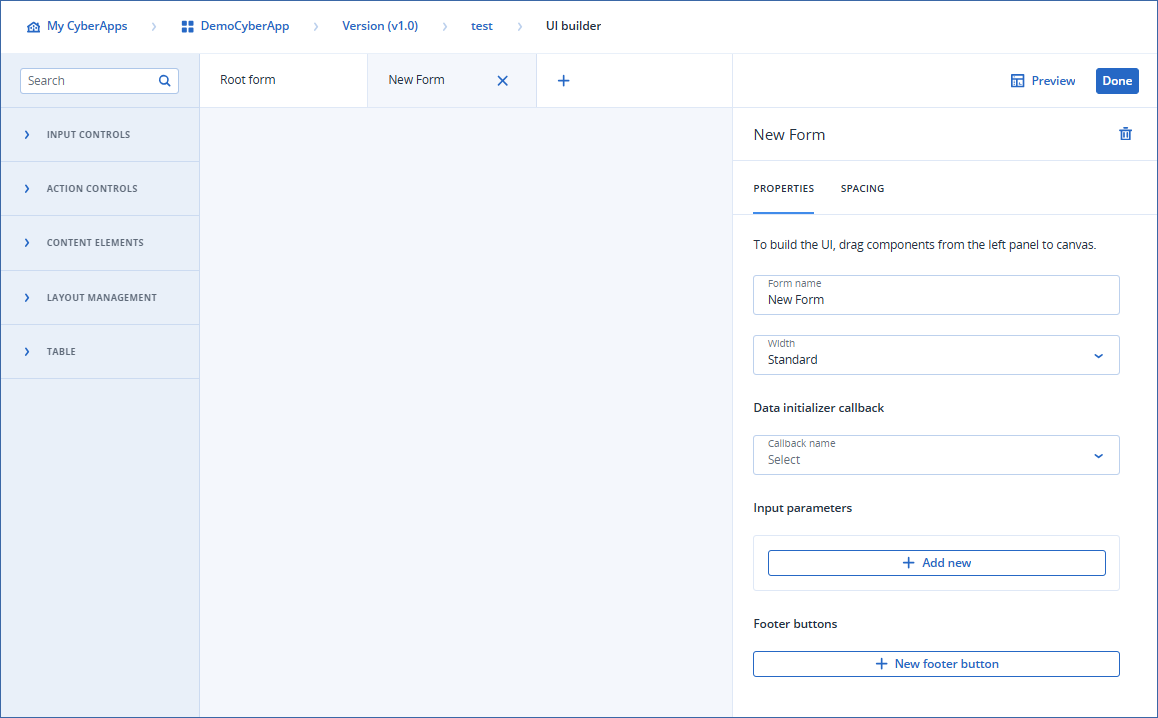
[Optional] Configure the new dependent form.
- [Optional] To rename the dependent form, enter the new name in the Form name field.This will appear as the window title, if the form is displayed as a pop-up, or as the panel title, if the form is displayed as a sidebar.
Select the Width property from the dropdown.
Standard
- WideThe display width is increased. The size depends on how form is displayed:
Pop-up: 1136px
Sidebar panel: 1024px
[Optional] Specify a data initializer callback.
[Optional] Specify a refresh callback.
[Optional] Add input parameters.
[Optional] Set up footer buttons.
- [Optional] Build the form.You can do this later, if you prefer.
Click Done.
Important
Clicking Done does not save your work.
Click Save changes to save your new dependent form.