Callback error handling
Callbacks can define their own error responses, but the Acronis API Callback Gateway provides default handling for specific HTTP error response codes and communication errors.
UI error message template
Error messages, that are displayed in the user interface, are constructed using the following template:
Could not establish connection to <CyberApp name> CyberApp. <human readable error message>. Please contact <company name> support (<contacts>).
Placeholder |
Description |
Source |
|---|---|---|
|
The official name of the CyberApp |
CyberApp Description > About CyberApp > Name |
|
Company name from support contact |
CyberApp Description > Support contact > Company name |
|
Contact information (comma-separated) |
CyberApp Description > Support contact > Website, Email, Phone (only non-empty values) |
|
See the human-readable error messages in “Default error response codes” and “Communication errors” |
Default error response codes
Status code |
Reason |
Human-readable error message |
|---|---|---|
|
The callback handler rejected the unauthorized request. |
The vendor cloud returned authentication failed (401). |
|
The callback handler rejected the request due to invalid credentials. |
The vendor cloud refused authorization (403). |
|
The callback handler is no longer available at the provided URL. |
Invalid response schema from the vendor cloud. |
|
The callback handler rejected the request due to too many requests. The request can be retried by API Callback Gateway. |
The vendor cloud returned an unexpected error code 4XX. |
|
The callback handler responded with an error that indicates a server error. |
The vendor cloud returned an unexpected error code 5XX. |
Enablement error messages
A callback handler can include a human-readable error message in the err_message field of the response body.
An error message may indicate a precondition that must be met before enabling the CyberApp for a partner or customer.
For example, a Managed Security Service Provider (MSSP) may need to sign a contract before enabling the CyberApp
for their customers and return an appropriate error message that will appear as follows:
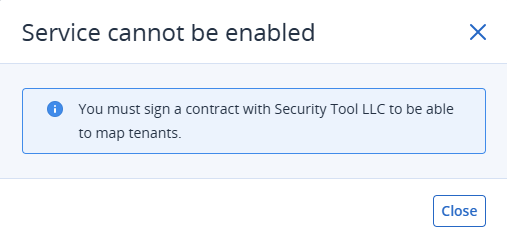
This message can be displayed in the user interface when attempting to enable the CyberApp in the following scenarios:
Communication errors
Error |
Reason |
Human-readable error message |
|---|---|---|
|
Acronis API Callback Gateway was unable to negotiate the secure protocol with the callback handler. |
SSL Handshake with the vendor cloud failed. |
|
Acronis API Callback Gateway was unable to verify the SSL certificate of the callback handler domain name. |
Failed to validate the vendor cloud SSL certificates. |
|
Acronis API Callback Gateway was unable to find a route to the callback handler. The request can be retried by API Callback Gateway. |
The vendor cloud is unreachable. |
|
Acronis API Callback Gateway was able to establish the connection but did not receive a response within the specific time. The request can be retried by API Callback Gateway. |
Timed out contacting the vendor cloud (522/524). |
|
Callback handler responded with a response within the 200-399 range that does not match any code defined for this callback. |
The vendor cloud returned an unexpected error code 2XX-3XX. |
|
Callback handler responded with a response within the 400-499 range that does not match any code defined for this callback or in the Status codes table. |
The vendor cloud returned an unexpected error code 4XX. |
|
Callback handler responded with a structure that does not match the schema defined for this callback. |
Invalid response schema from the vendor cloud. |
|
Callback handler received a request from the user interface which structure does not match the schema defined for this callback. |
Acronis internal error. Please contact support. |